VL03 Database Basics
Tables in the relational model (multisets of rows), SQLite3, database design with primary and foreign keys, and the semantics of basic SELECT–FROM–WHERE queries via the cross-product.
Organisation#
Tables#
A database stores its data in tables (Slide 7). The structure of a table is fixed by its schema: a fixed number of columns, each with a name and a domain (the set of possible values). The contents are stored in rows; while the schema is fixed, rows can be added, changed and deleted over time, and a table may have 0 rows.
| title | year | rating |
|---|---|---|
| The Shawshank Redemption | 1994 | 9.3 |
| The Dark Knight | 2008 | 9.1 |
| Inception | 2010 | 8.8 |
| Fight Club | 1999 | 8.8 |
Sets vs. multisets#
A set contains each element at most once; a multiset may contain an element several times (Slide 9):
- Codd’s original relational model (1969) only allowed sets. Most modern database systems allow multisets by default, so the formal definition above does too.
- Checking for duplicates costs time and space. If uniqueness is needed, most systems let you declare a uniqueness constraint when creating the table.
Order (Slide 10): neither sets nor multisets have an order. A database does not have to remember the insertion order, and it can sometimes work more efficiently when it may reorder rows. If an order is needed, add a column with a row counter; most systems (SQLite3 included) offer an auto-incrementing counter, but it costs time and space, so use it only when needed.
Multiple tables and queries#
A database usually has several tables, and different tables often share columns; shared columns are what allows meaningful combination of data across tables (Slide 11). Deciding which tables, with which schemas, store the given data is the problem of database design, which matters for both usability and efficiency.
Tables are queried with SQL (Structured Query Language) (Slide 12). There are many dialects, but the core is the same in almost all systems. Title and rating of all movies with rating at least 8.0:
SELECT title, rating FROM movies WHERE rating >= 8.0;
SQLite3#
A system that manages relational tables is a relational database management system (RDBMS), e.g. MySQL, PostgreSQL, Microsoft SQL Server, SQLite, Oracle Database, MariaDB, IBM Db2, SAP HANA (Slide 13). The course uses SQLite3: a fully functional RDBMS that is very easy to use and reasonably efficient when the data is not very large.
Usage (Slide 14):
sudo apt install sqlite3   # Debian/Ubuntu
sqlite3                    # in-memory database
sqlite3 movies.db          # database stored in that file (created if missing, reused if it exists)
There are two kinds of commands:
- SQL commands must end with a semicolon.
- SQLite commands start with a dot and have no semicolon.
SQLite commands (Slide 15):
.separator "<TAB>"          column separator for input and output (type TAB with Ctrl+V TAB)
.import movies.tsv movies   read table "movies" from a TSV (tab-separated values) file
.read <file>                execute commands from a script file (typically *.sql)
.timer on                   show the execution time of every command
.help / .help import        list commands / help on one command
SQL commands (Slide 16):
-- movies is the table name; title, year, rating are column names; TEXT, INTEGER, REAL their domains
CREATE TABLE movies(title TEXT, year INTEGER, rating REAL);
SELECT title, year, rating FROM movies WHERE rating >= 8.0;
DROP TABLE IF EXISTS movies;   -- no error if the table does not exist
Database Design#
Motivation (Slide 17): in movies, each movie has exactly one title, one year and one rating. Now we want to store which actor played in which movie. A movie has many actors and most actors play in several movies, but a single cell cannot easily hold several values. How to store this in tables is the central question of database design.
| Solution | Idea | Verdict |
|---|---|---|
| 1 (Slide 18) | extra column roles in movies with all actor names concatenated | terrible: hard to extract a single actor, hard to add information about the role |
| 2 (Slide 19) | extra column actor, one row per actor, repeating title/year/rating | not that bad (query results will often look like this), but tables should not be created like that |
| 3 (Slide 20) | separate table roles(title TEXT, actor TEXT) | much better (a column for the role could be added easily), but names are used as identifiers |
| 4 (Slide 22) | unique IDs for movies and persons; roles stores pairs of IDs | the right design |
Solution 4 (Slide 22): give each row of movies a unique ID (e.g. the Wikidata ID), add a table persons with a unique ID per person (plus the birth date), and let roles reference both IDs:
CREATE TABLE movies(id TEXT, title TEXT, year INTEGER, score REAL);
CREATE TABLE persons(id TEXT, name TEXT, birth_date DATE);
CREATE TABLE roles(movie_id TEXT, person_id TEXT);
Example rows (Slide 23):
| id | title | year | rating |
|---|---|---|---|
| Q172241 | The Shawshank Redemption | 1994 | 9.3 |
| Q163872 | The Dark Knight | 2008 | 9.1 |
| Q25188 | Inception | 2010 | 8.8 |
| Q190050 | Fight Club | 1999 | 8.8 |
| id | name | birth_date |
|---|---|---|
| Q48377 | Morgan Freeman | 1937-06-01 |
| Q95048 | Tim Robbins | 1958-10-16 |
| Q45772 | Christian Bale | 1974-01-30 |
| Q202381 | Maggie Gyllenhaal | 1977-11-16 |
| movie_id | person_id |
|---|---|
| Q172241 | Q48377 |
| Q172241 | Q95048 |
| Q163872 | Q48377 |
| Q163872 | Q45772 |
| Q163872 | Q202381 |
Primary key and foreign key#
In an RDBMS (including SQLite3) the keys can be declared explicitly (Slide 25):
CREATE TABLE movies(id TEXT PRIMARY KEY,
                    title TEXT, year INTEGER, score REAL);
CREATE TABLE persons(id TEXT PRIMARY KEY,
                     name TEXT, birth_date DATE);
CREATE TABLE roles(
  movie_id TEXT REFERENCES movies(id),
  person_id TEXT REFERENCES persons(id));
The RDBMS then checks that every row has a primary key, that it is unique, and that every foreign key value exists in the referenced table.
Relationships between tables#
Two tables and sharing keys (directly or via other tables) stand in one of four relationships (Slide 26):
| Kind | Meaning |
|---|---|
| 1:1 | each record in can be associated with exactly one record in |
| 1:N | a record in can be associated with several records in , but each record in with only one record in |
| N:1 | like 1:N, the other way round |
| N:M | a record in can be associated with several records in and vice versa |
SQL Basics#
The semantics is built up incrementally for the running example (all roles: which person played in which movie):
SELECT movies.title, persons.name
FROM movies, persons, roles
WHERE roles.person_id = persons.id
  AND roles.movie_id = movies.id;
FROM: the cross-product#
SELECT * FROM movies, persons, roles; computes the cross-product of the tables listed in FROM: the set of all with , i.e. all combinations obtained by taking one row from each table (Slide 29). With and the number of columns and rows of a table:
WHERE: filtering the cross-product#
Different tables can use the same column name, so columns are disambiguated as <table name>.<column name> (Slide 33). A query with a WHERE clause computes all rows of the cross-product (from FROM) for which the WHERE expression evaluates to true. In the example, only the rows in which the role’s person_id matches the person’s id and the role’s movie_id matches the movie’s id survive, i.e. exactly one row per role:
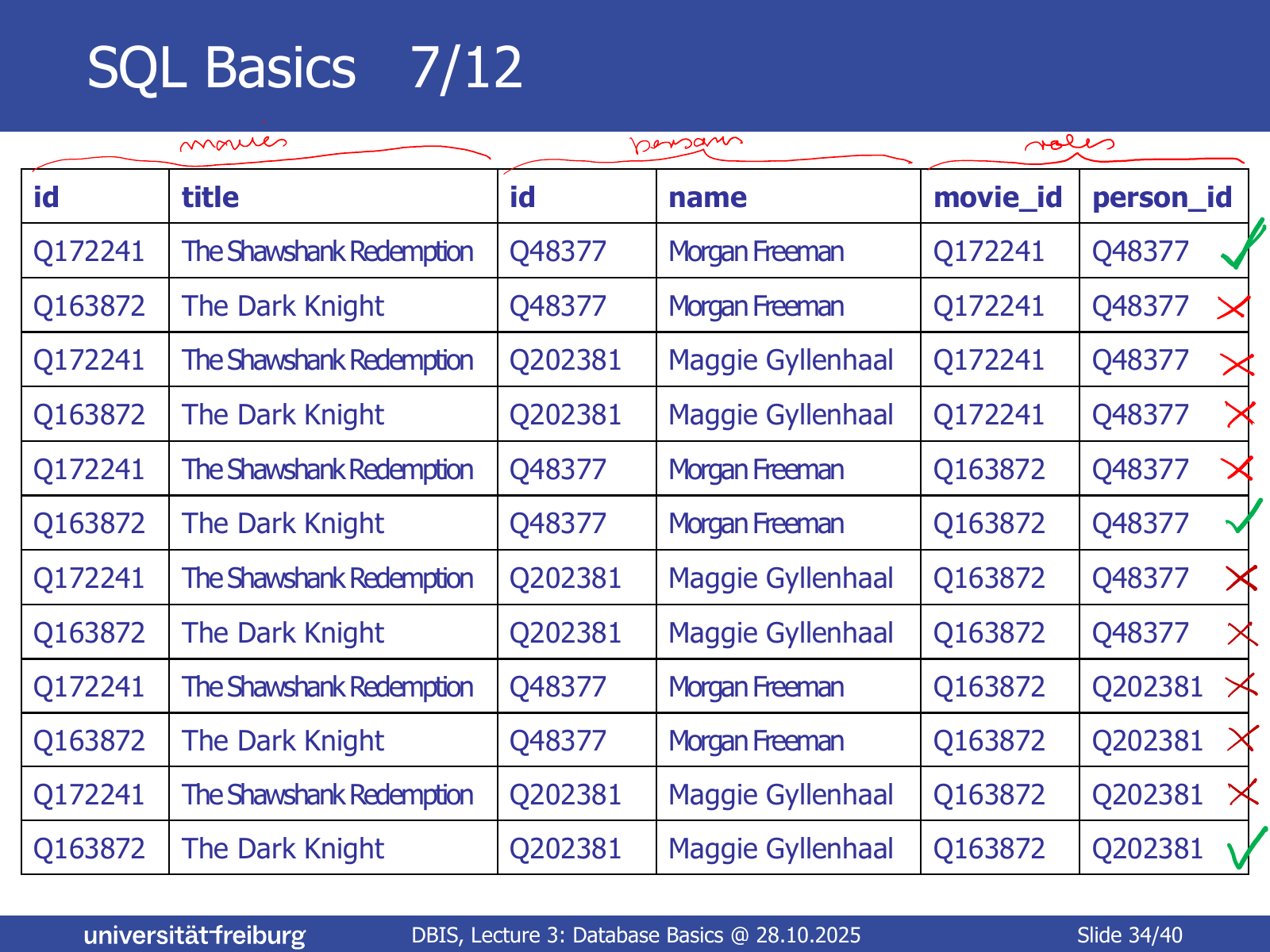
| id | title | id | name | movie_id | person_id |
|---|---|---|---|---|---|
| Q172241 | The Shawshank Redemption | Q48377 | Morgan Freeman | Q172241 | Q48377 |
| Q163872 | The Dark Knight | Q48377 | Morgan Freeman | Q163872 | Q48377 |
| Q163872 | The Dark Knight | Q202381 | Maggie Gyllenhaal | Q163872 | Q202381 |
(Slide 35)
SELECT: choosing columns#
The full query computes all rows of the cross-product for which the WHERE expression is true, restricted to the columns listed in SELECT (Slides 36–37):
| title | name |
|---|---|
| The Shawshank Redemption | Morgan Freeman |
| The Dark Knight | Morgan Freeman |
| The Dark Knight | Maggie Gyllenhaal |
Concepts#
- Relational Model — formal definition of a table as with a multiset of rows; primary and foreign keys
- SQL Query Structure — basic
SELECT … FROM … WHERE …queries and their semantics via cross-product, filter and column choice - Cross-product (Cartesian product) — semantics of the
FROMclause; add up, multiply - Database design — choosing tables and schemas; movies/persons/roles with IDs
- Table relationships (1:1, 1:N, N:1, N:M) — how tables relate via primary and foreign keys
- Multiset — rows may repeat and have no order