The join operation and its computation via hash join and merge join, outer/natural/non-equi joins, the formal group-by operation with HAVING, and ORDER BY, LIMIT/OFFSET and subqueries in SQL.
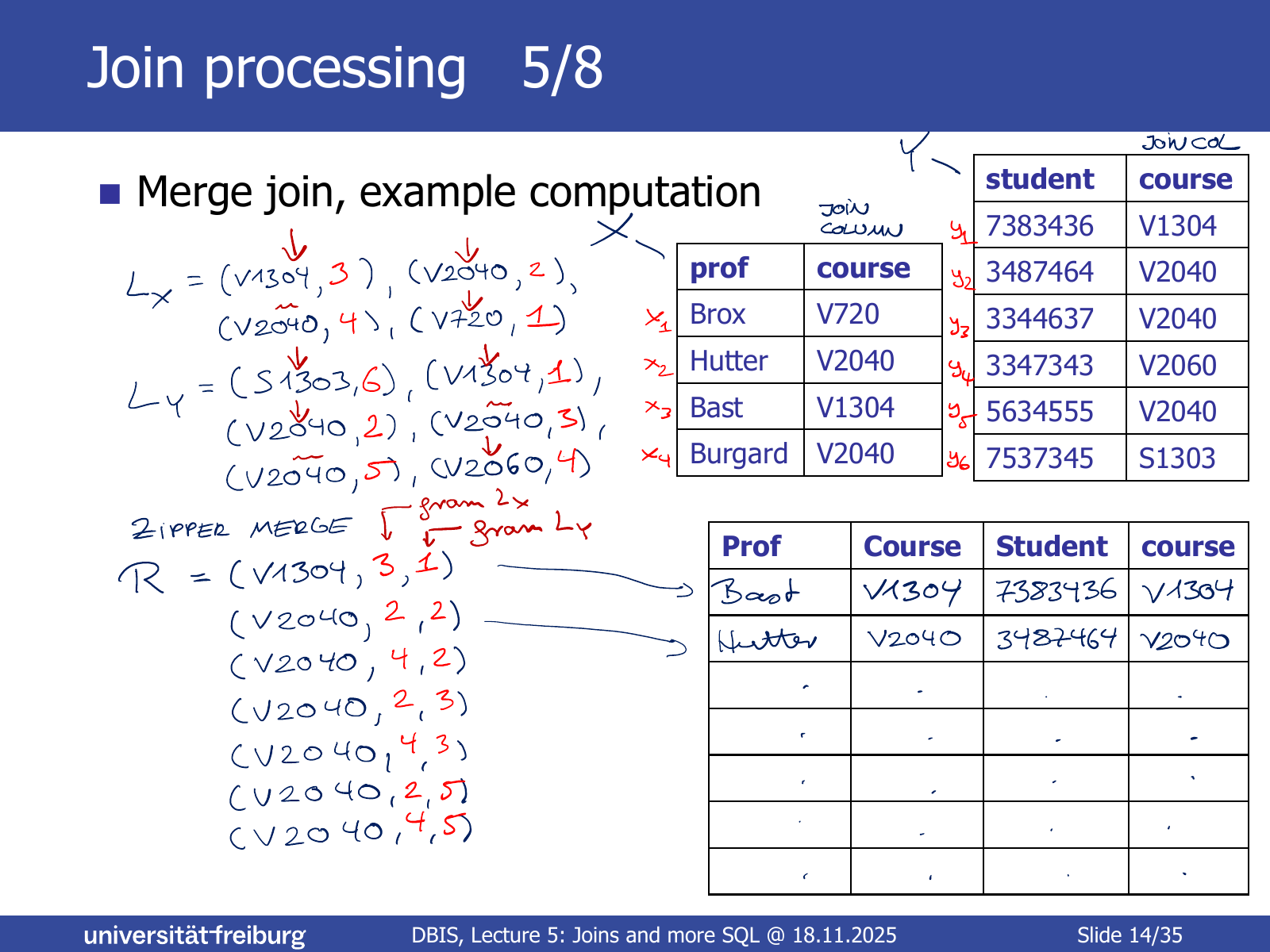
Motivation (Slide 5). A very frequent pattern in SQL queries: two tables T1,T2 in the FROM clause and a condition T1.col1 = T2.col2 in the WHERE clause. The query from Lecture 4 contains it twice:
SELECT movies.title, persons.name
FROM movies, persons, roles
WHERE roles.person_id = persons.id
AND roles.movie_id = movies.id;
A table is a triple T=(D,C,R) in the sense of the Relational Model: C the tuple of column names, D the tuple of domains, R the multiset of rows.
Single-column: the equality constraint concerns only one column of each table. A multi-column join (same number of columns from each table) can be defined analogously.
Equi-join: the condition is equality of the values in column j1 of T1 and j2 of T2. Other conditions are possible.
SQLite3 has no hash join. Its documentation (https://www.sqlite.org/optoverview.html) claims, dubiously, that “an automatic index is about the same thing as a hash join”.
SQLite3 does not perform a merge join either. It always iterates over the values of one join column and searches them in the other, using an index if one exists or building a temporary index otherwise (more in Lecture 6).
A typical RDBMS supports both merge and hash joins; choosing between them is part of query planning.
Inner and outer joins (Slide 18). The join defined above only includes rows whose join value occurs in both tables: an inner join (the default). Variants:
Left outer join: additionally include the rows of T1 (“left”) whose join value does not occur in T2; the missing columns are filled with NULL.
Right outer join: analogously for the rows of T2.
(Full) outer join: both left and right.
These are not defined formally in the lecture, only by example.
The following three queries are equivalent:
SELECT*FROM profs, studis WHERE profs.course = studis.course; -- traditional
SELECT*FROM profs JOIN studis ON profs.course = studis.course; -- most modern
SELECT*FROM profs NATURALJOIN studis; -- join columns (too) implicit
Non-equi join (Slide 22). The join condition need not be equality. Example, a spatial join: all restaurants within 500 m of a bus stop.
CREATETABLE bus_stops(name TEXT, loc POINT);
CREATETABLE restaurants(name TEXT, loc POINT);
SELECT*FROM bus_stops JOIN restaurants
ON ST_Distance(bus_stops.loc, restaurants.loc) <500;
The exact syntax depends on the database; SQLite3 needs the SpatiaLite extension.
Motivation (Slide 23). Many queries group the rows of a table by a common value and compute something per group, e.g. all movies by the same director and their average IMDb score (a variant is on ES5).
The slide uses j for both the aggregate index and the “for all” quantifier; here i is used for the latter. See Grouping.
HAVING (Slide 26). To keep only groups with max_score > 8.0, a WHERE condition does not work: max_score is not a column of the original table but is created by the GROUP BY. Conditions on the results of aggregate functions are written in the HAVING clause.
Implementation and cost estimates (Slide 28). The straightforward implementation uses a hash map from grouping values to groups (part of ES5, Exercise 1). For an input table with n rows and an output table with k columns:
cost∼n⋅k,rows∼n/2,cols=k.
Assumptions: the average group size is 2 (arbitrary and unrealistic); insertion into a hash map takes constant time (realistic); evaluating fj takes time linear in the number of arguments (often realistic).
Limits of GROUP BY (Slide 29). “For each year, the movie with the highest score and its title” needs a GROUP BY but cannot be expressed with GROUP BY alone. The query above yields the maximum score per year, but GROUP BY aggregates per column, while here the title is needed from the row that has a property (highest score) in another column.
(Slide 30) The SQL standard (ISO/IEC 9075:2023) has hundreds of pages; the course covers only the most important operations (see https://sqlite.org/lang.html). The following three are explained by example only, without formal operations. All are needed frequently and on ES5. Their position in a query is summarised in SQL Query Structure.
(Slide 31) By the definition from Lecture 4, tables are multisets of rows and have no inherent order. An order for the final result is requested with ORDER BY <expression> [ASC|DESC] at the end of the SELECT query. With a GROUP BY, the ORDER BY comes after it.
SELECT*FROM movies ORDERBY score DESC;
SELECTyear, MAX(score) AS max_score FROM movies
GROUPBYyearORDERBYyearASC;
(Slide 32) Given an order, LIMIT restricts the result to a prefix of the sorted rows, and OFFSET skips rows to select a segment in the middle.
-- the 10 movies with the highest scores
SELECT title, score FROM movies
ORDERBY score DESCLIMIT10;
-- the 5 movies after the top 10
SELECT title, score FROM movies
ORDERBY score DESCLIMIT5OFFSET10;
Clause order: GROUP BY → ORDER BY → LIMIT / OFFSET.
(Slide 33) All operations take tables as arguments and a SELECT query produces a table. Hence, wherever SQL expects a table, a whole SELECT query in parentheses can be written instead.
SELECT title FROM movies
JOIN directors ON movies.movie_id = directors.movie_id
JOIN (
SELECTDISTINCT person_id FROM awards
WHERE award_name LIKE'Academy Awards%') AS awardees ON directors.person_id = awardees.person_id;
Explanation (Slide 34). The subquery yields a one-column table with the person IDs of all Oscar winners. Effectively the query runs on