VL10 Web Applications, Part 2
Making the search web app dynamic with JavaScript (DOM, fetch, async/await, promises, JSON), web app vulnerabilities (private data, code injection, same-origin policy, CORS) and Unicode with UTF-8 and URL encoding.
Organisation#
Slides 2–4: feedback on ES9 (static web app) was very positive; demos of some student web apps follow next lecture. Exam: 17.03.2026, 9:00 (172 registrations at the time). ES10 (DBIS Sheet 10 (not published)): make the web app dynamic (“search as you type”), secure, handle Unicode properly, and add SPARQL results.
JavaScript#
What is JavaScript#
Slide 5- A programming language for code that runs inside a web browser and interacts with a web page. Almost every web page contains JavaScript; it is also used outside the browser (Node.js).
- In principle as powerful as any other language (Turing-complete). In the browser, however, it has only limited access to many resources, in particular the file system.
- It can manipulate the elements of a web page and communicate with other machines.
Language features#
Slide 6- Object-oriented script language with no particular similarity to Java. The name was a marketing move: Java was popular at the time and also used for web stuff.
- Speed similar to Python when interpreted line by line; modern browsers do just-in-time (JIT) compilation.
- Variables are untyped (TypeScript adds types).
let x = 1;                           // Scalar value.
let s = "doof";                      // String.
let a1 = [1, "doof", "bloed"];       // Array (mixed types).
let a2 = { "yes" : 5, "no" : 3 };    // Associative array / map.
Variable declaration#
Slide 7The three kinds of declarations differ in scope and changeability:
| Keyword | Scope | Changeability |
|---|---|---|
var | outside a function: the whole file; inside a function: the whole function | reassignable; old, use rarely or never |
let | strictly the { … } block of the declaration | reassignable |
const | like let | must be initialised on declaration, cannot be reassigned |
DOM#
Slide 8<div id="result">NO RESULT YET</div>
<input id="input" type="text" autocomplete="off">
// 1. Set the contents of the element with a given id
document.querySelector("#result").innerHTML = "42";
// 2. React to a user action (here: input into the input field)
document.querySelector("#input")
        .addEventListener("input", function() { ... });
querySelector takes a CSS selector (#id selects by id).
JavaScript as part of the HTML#
Slide 9<!-- Option 1: inline code, parsed and executed as soon as it is encountered -->
<script> ... arbitrary JavaScript code ... </script>
<!-- Option 2: code from a file (in the head of the HTML structure) -->
<head>
<script src="search.js" defer></script>
</head>
- Without
defer: executed when encountered. - With
defer: executed after the complete HTML has been parsed and the DOM of the page has been constructed.
Communicating with other machines via fetch#
Slide 10A script sends a request to another machine and receives the result in an asynchronous function (AJAX and Fetch API):
async function myFct() {
  ...
  const response = await fetch("api?query=42")
                           .then(response => response.text());
}
This uses asynchronous functions with async, await, then and the => operator, explained in the following subsections.
Asynchronous functions#
Slide 11- JavaScript is single-threaded: at every point in time, at most one line of JavaScript code is interpreted and executed.
- Still, it supports asynchronous functions: some built-in functions are asynchronous (
fetch,setTimeout), or a function can be declaredasync. - An asynchronous function can spend part of its time outside the normal JavaScript execution, e.g.
fetchwaits for the other machine to answer. In the meantime, other JavaScript can (and will) be executed.
async, await, then#
Slide 12All three pertain to asynchronous execution:
async: a function that calls an asynchronous function (and waits for it) must be declaredasync; otherwise it is an error.await: wait for the result of an asynchronous function; other JavaScript code is executed in the meantime.then: when the result of the asynchronous function is ready, process it with the given function.
In the fetch example: fetch first returns the header (a response object); then returns the body as an object of the specified type (text(), json(), …); await blocks until this is done. All three are used in search.js and needed for ES10.
Promises#
Slide 13One can also work with Promise objects explicitly:
const promise = new Promise(function(resolve, reject) {
  // Code that calls the function "resolve" on success
  // and the function "reject" on failure
});
For the built-in functions, async, await and then suffice; promises are then handled implicitly.
The => operator#
Slide 14Many functions take an anonymous function as argument. => is a shortcut for an anonymous function that consists solely of a return statement; the two calls are exactly equivalent:
response = await fetch("...").then(
     function(response) { return response.json() } );
response = await fetch("...").then(
     response => response.json() );
// Multiple arguments:
new Promise( (resolve, reject) => reject("I always fail") );
JSON#
Slide 15[ 2, 3, 5, 7, 11, 13 ] // an array
{ "query": "6*7", "result": "42" } // a map
After response => response.json(), the parsed object is assigned to response and used directly: response[2] (third element of an array), response.result (value for a key of a map).
Multi-threaded server#
Slide 16- The JavaScript of ES10 generates concurrent requests: when typing fast, new requests are sent before previous ones have completed.
- A typical server therefore handles each request in its own thread, so requests are processed in parallel and an expensive request does not block the server.
- Python is notoriously bad at multi-threading: the global interpreter lock (GIL) allows only one piece of Python code to be interpreted at a time. The
multiprocessingmodule forks the whole process with all its data (here: the q-gram index). There is nowpython3.14-nogil(see forum post).
Vulnerabilities#
Motivation#
Slide 17Web apps are particularly vulnerable to privacy breaches: data and code are sent back and forth between multiple computers (foreign to each other), with many layers of software and hardware in between. Three kinds of vulnerabilities:
- access to private data,
- execution of code injected by an attacker,
- communication of trusted information to an untrusted site.
Overview of the top 10: OWASP Top Ten (OWASP = Open Web Application Security Project).
Access to private data#
Slide 18A server must serve only the files and data it is meant to serve. Simple, easy-to-overlook exploit against a server that serves any existing file path:
http://tura:8888//etc/passwd
Fix: restrict access carefully, e.g. serve only files in a certain directory subtree; even safer, serve only files from a whitelist and return 404 Not Found or 403 Forbidden for everything else.
Code injection#
Slides 19–20Fix: carefully check the content that is dynamically added to a web page. In the app, if you don’t pay attention, strange things might happen.
Same-origin policy (SOP)#
Slide 21Why: suppose you get redirected to an evil site that looks just like your bank’s site (e.g. http://www.comdirekt.de). Without the SOP, the evil site could communicate with the bank’s server like the real site; worse, with a stolen session cookie the attacker could do anything in your name without you even participating.
CORS#
Slide 22The course server sends Access-Control-Allow-Origin: * for its api responses, so the page can fetch from http://amur:8888/api?... even if it was loaded from elsewhere.
Exceptions to the SOP#
Slide 23- JavaScript can be loaded from anywhere, which is important for libraries:This seemed reasonable because in HTML, objects like images can also be loaded from anywhere.
<script src="http://code.jquery.com/jquery-1.10.2.js"></script> - It enables hacks like JSONP, formerly a standard to send JSON cross-origin: dynamically add a piece of HTML like
<script>callback("…")</script>to the DOM, which executescallback, which then does what one wants. No longer allowed, but similar exploits still exist.
According to a margin note on slide 21, this SOP/CORS part is not needed for ES10 (the note says “Slides 22–24”; the slide references in this deck are partly off by one).
Unicode#
Motivation#
Slides 24–25To represent text in binary, one needs a standard mapping from characters to numbers. For a long time this was ASCII, with 1 byte per symbol, so at most 256 symbols. There are far more symbols in the world (Chinese alone has tens of thousands).
Solution before Unicode:
- Codes 32–126 for the common symbols everybody needs (
a-z A-Z 0-9 ( ) [ ] { } , . : ; " '…); codes 0–31 and 127 are control characters. - Codes 128–255 have many different variants depending on the context. One variant is ISO-8859-1: the most frequent special characters of most European languages (
àáâãäåçèéëìíîïðñòóôõöø…). - Problem: if a document needs more than one variant, the encoding has to be switched in the middle of the document.
Code points#
Slide 26| Character | Code point (dec) | hex | Bytes to store the number |
|---|---|---|---|
| a | 97 | 61 | 1 |
| A | 65 | 41 | 1 |
| ä | 228 | E4 | 1 |
| α | 945 | 03B1 | 2 |
| € | 8364 | 20AC | 2 |
| 😀 | 128512 | 1F600 | 3 |
One byte is not enough for most characters, and two bytes are not enough for all of them.
UTF-32, UTF-16, UTF-8#
Slide 27UTF (Unicode Transformation Format) = scheme for representing code points in binary.
- UTF-32: always 4 bytes per code point, enough for all of them. Fixed-size encoding.
- UTF-16: 2 bytes for the common code points, 4 bytes for the others; used for Java strings. Variable-byte encoding.
- UTF-8: 1 byte for the very common code points, 2, 3 or 4 bytes for the others. Variable-byte encoding.
UTF-8 in detail#
Slide 28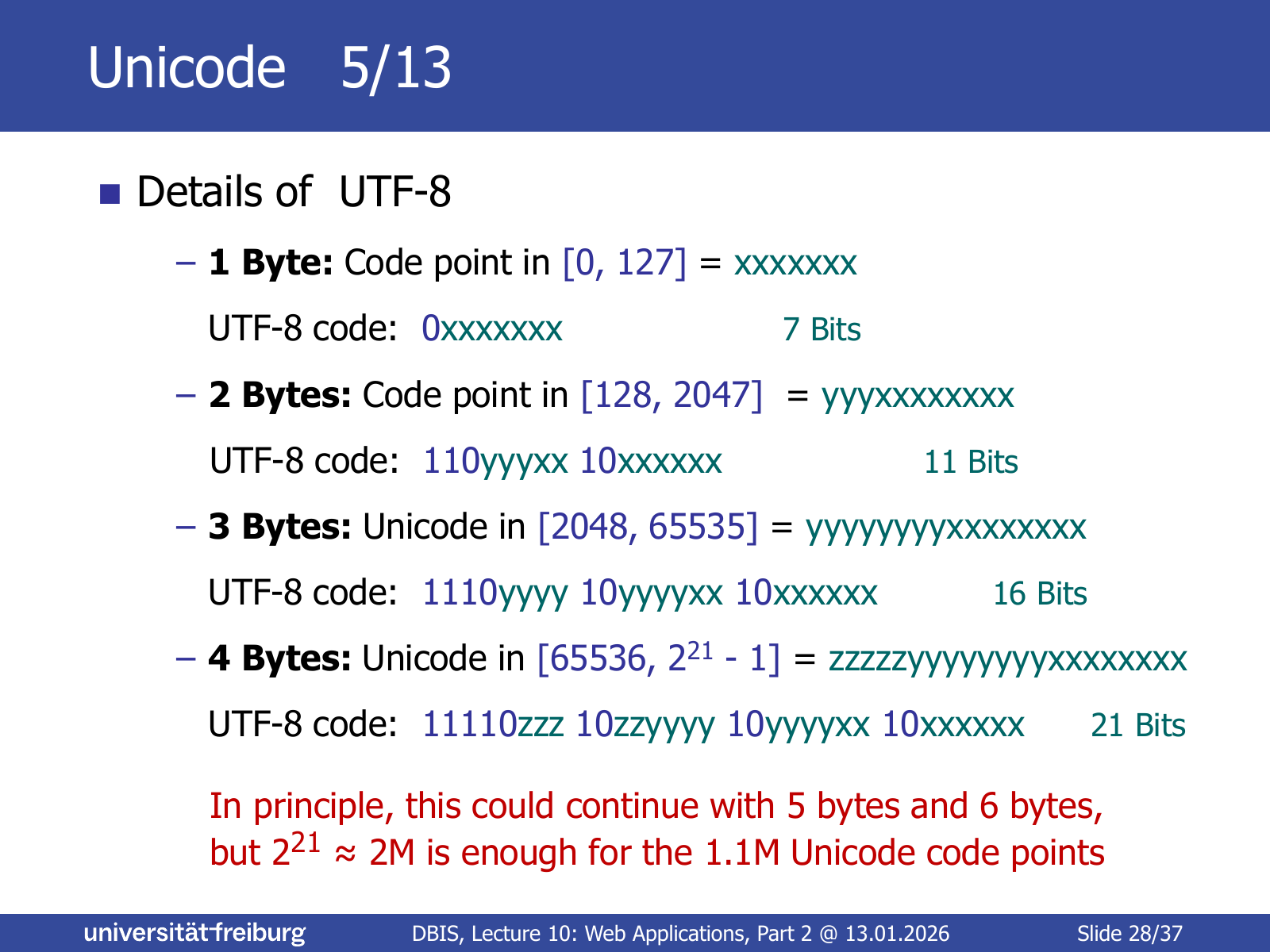
Let be the code point. The bits of (letters on the slide, from least to most significant) are distributed over the payload positions of the bytes:
| Bytes | Code point range | Payload bits | UTF-8 code |
|---|---|---|---|
| 1 | 7 | 0xxxxxxx | |
| 2 | 11 | 110yyyxx 10xxxxxx | |
| 3 | 16 | 1110yyyy 10yyyyxx 10xxxxxx | |
| 4 | 21 | 11110zzz 10zzyyyy 10yyyyxx 10xxxxxx |
In principle this could continue with 5 and 6 bytes, but is enough for the 1.1M code points.
Properties of UTF-8#
Slides 29–30- ASCII compatible: a string of characters with ASCII codes is identical in ASCII and UTF-8. So old C/C++ code only fails on the special characters.
- ISO-8859-1 compatible (in a simple way): a character with ISO-8859-1 code
1xyyyyyy(128–255) has the 2-byte UTF-8 code1100001x 10yyyyyy. E.g. ä0xE40b11100100in ISO-8859-1 and0b11000011 0b101001000xC3 0xA4in UTF-8. - Only rarely used characters need more than 2 bytes.
- Easy to decode: codes start and end at byte boundaries, and decoding can start anywhere in a string: just move to the next byte not starting with
10. - In a multi-byte character, all bytes are , and conversely such bytes occur only in multi-byte characters.
- The number of leading 1s in the first byte of a multi-byte character equals the number of bytes of its code.
- For every code point in there is exactly one valid UTF-8 sequence. Not every byte sequence is valid UTF-8, e.g.
1100000x 10xxxxxxis invalid: that code point is and must be encoded with 1 byte as0xxxxxxx. - Invalid bytes in a UTF-8 sequence are displayed as
�.
URL encoding and decoding#
Slides 31–32- Only a restricted character set is allowed in a URL (
a-z A-Z 0-9 $ % / - _ . + ! *and a few more); space, ä, ã, â, … are not allowed. - The arguments of a
GETrequest are part of the URL (the?query=...part of the web app). In ES10 it can contain characters as in Smørrebrød, Gemüsesoufflé or Crème brûlée. - The encoding of the HTML page is specified in its head:
<head> … <meta charset="utf-8"> … </head>. - In
fetch, special characters are URL-encoded: each byte becomes%followed by its code in hexadecimal; the default encoding is UTF-8. E.g. ä has UTF-8 codeC3 A4and is URL-encoded as%C3%A4.
Encoding in files#
Slide 33What you see in a text editor or terminal depends on the encoding the editor/terminal uses to interpret the bytes (usually changeable in its menu). To see the byte-wise contents of a file independently of any encoding, use xxd:
xxd <file>        # hex codes + chars, 16 bytes per line
xxd -g 1 <file>   # groups of 1 byte (default: 2 bytes)
xxd -b <file>     # binary codes + chars, 6 bytes per line
Encoding in C++, Java and Python#
Slides 34–36 (outputs on a UTF-8 terminal)
C++11: std::string is an array of char (1 byte), std::wstring an array of wchar_t (code points).
std::string s = "\xc3\xa4"; std::cout << s;          // outputs ä
std::wcout.sync_with_stdio(false);
std::wcout.imbue(std::locale(""));
std::wstring w = L"ä"; std::wcout << w;              // outputs ä
// Convert between std::string and std::wstring
std::wstring_convert<std::codecvt_utf8<wchar_t>> conv;
std::string utf8string = conv.to_bytes(L"ä");       // { c3, a4 }
std::wstring wstring = conv.from_bytes("ä");        // { U+00e4 }
Java: String is an array of char (2 bytes each), UTF-16 encoded, so charAt runs in constant time but returns UTF-16 units, not characters. Characters outside the 2-byte range take two chars (a surrogate pair).
"ä".length();                          // 1        (U+00E4)
"😀".length();                         // 2
"😀".charAt(0);                        // � (U+D83D)
"😀".charAt(1);                        // � (U+DE00)
"😀".codePointAt(0);                   // 128512   (U+1F600)
byte[] b = "ä".getBytes("UTF-8");      // { 0xc3, 0xa4 }
new String(b, "UTF-8").charAt(0);      // ä (U+00E4)
Python 3: byte strings b"…" and Unicode strings u"…" (= "…").
print(b"\xc3\xa4")                     # b'\xc3\xa4'
print(b"\xc3\xa4".decode("UTF-8"))     # ä
print(b"\xc3\xa4".decode("ISO-8859-1"))  # ä
print(len(u"ä"))                       # 1
print(u"ä".encode("UTF-8"))            # b'\xc3\xa4'
# -*- coding: iso-8859-1 -*-          (source file actually saved as UTF-8)
print(u"ä")                            # ä
print(u"ä".encode("utf-8"))            # b'\xc3\x83\xc2\xa4'
References#
Slide 37: Wikipedia on CORS, cross-site scripting and UTF-8; utf8-chartable.de; the w3schools URL-encoding reference.
Concepts#
- DOM Manipulation —
querySelector,innerHTML,addEventListener("input", …)to make the page dynamic - AJAX and Fetch API —
fetch+then(r => r.json())+awaitto get results from the server without reloading - Code Injection Protection — injected
<script>/javascript:content via search box, links and forum posts - URL Encoding — percent-encoding of the UTF-8 bytes of special characters (
ä→%C3%A4) - Character Encoding — strings vs. bytes needs an explicit encoding such as UTF-8
- HTML Structure — the page skeleton that JavaScript manipulates
- HTTP Server — the Python server answering the
fetchrequests with JSON - JavaScript Variable Declarations (
var/let/const) — scope and reassignability - Asynchronous Functions (
async/await/then) — single-threaded execution with waiting outside the JS thread - Promise — status (pending/fulfilled/rejected) + result of an asynchronous execution
- Arrow Function (
=>) — shorthand for an anonymous function returning one expression - JSON — results sent as JavaScript literals, media type
application/json - Web Workers — multithreading in the browser
- Global Interpreter Lock (GIL) — why a multi-threaded Python server does not run Python code in parallel
- Same-Origin Policy — browser rule: same domain + port
- CORS —
Origin/Access-Control-Allow-Originheaders for cross-origin results - JSONP — historic SOP workaround via injected
<script> - Unicode Code Point — unique number per character, to
10FFFF - UTF-8 — variable-byte encoding with 1–4 bytes; ASCII compatible, self-synchronising
- UTF-16 / UTF-32 — Java strings / fixed 4-byte encoding
- ISO-8859-1 — pre-Unicode 1-byte encoding for European special characters